
.png)
Every HR team has the same onboarding story. A new hire's first day arrives, and someone is scrambling: IT hasn't provisioned the laptop, the manager forgot to send the pre-read, payroll is missing a direct deposit form, and the buddy pairing never happened. Nobody dropped the ball on purpose. The process just isn't a process — it's a checklist that lives in someone's head.
Rippling's Workflow Studio exists precisely to close that gap. But most teams use it the way they used their old checklists: manually, reactively, and only for the obvious stuff. The automation potential runs much deeper. Here's how to build an onboarding workflow on Rippling that removes the hand-off points where things actually fall apart.
The most common mistake is treating Rippling Workflow Studio like a task manager. Teams build a workflow that reminds people to do things rather than one that does things. There's a meaningful difference between "send Slack message to IT: provision laptop for [Name]" and having Rippling automatically enroll the new hire in the correct device management group the moment their record is created.
The second mistake is scoping too narrow. Teams automate offer letter delivery and stop there. But the onboarding experience spans five to six weeks, involves a dozen systems, and touches payroll, IT, legal, and the hiring manager. If your Workflow Studio only fires on Day 1, you're leaving most of the value on the table.
Third: not using conditions. A workflow that treats a full-time exempt employee in Ontario the same as a part-time hourly employee in Texas isn't a workflow — it's a broadcast. Conditions are what turn a generic task list into something that actually fits the hire.
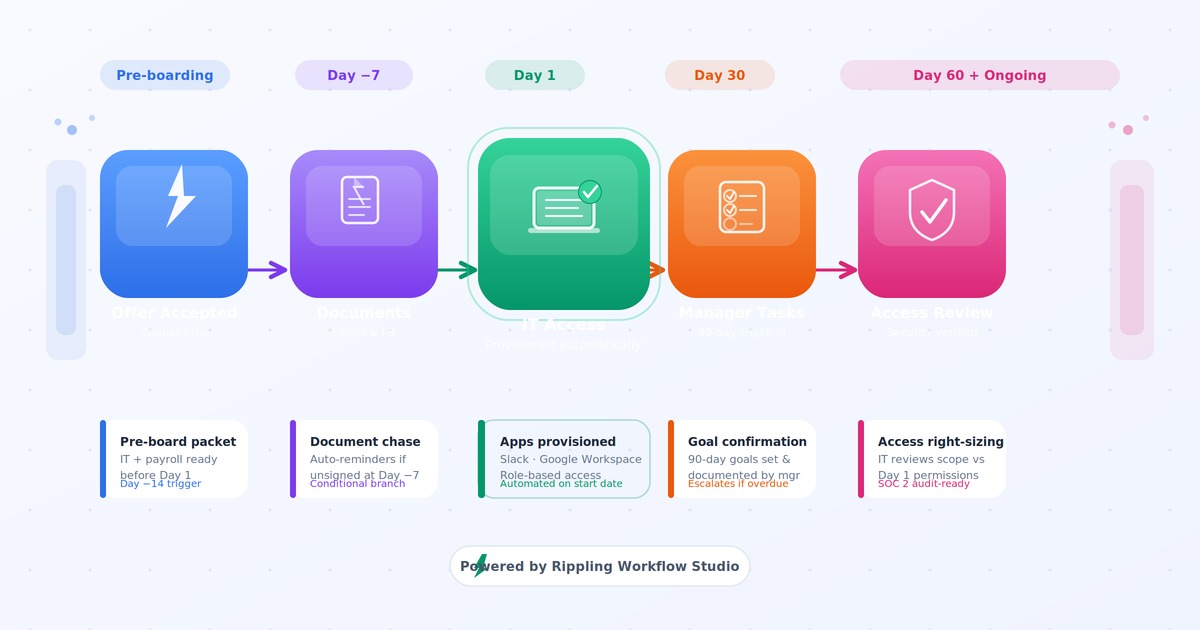
Set your primary onboarding workflow to trigger when the offer is accepted and the new hire's record is created — not on the first day itself. This gives you the pre-boarding window to accomplish everything that needs to happen before someone walks in the door.
In the pre-boarding phase (Day -14 through Day -1), your workflow should handle:
IT provisioning initiation. If you're using Rippling's IT module and device management, device assignment and app provisioning can be triggered automatically based on role group. The new hire gets enrolled in the right software bundle — Slack, Google Workspace, your project management tool — before they've sent a single email.
Document collection. Rippling can send the I-9, direct deposit authorization, and any jurisdiction-specific acknowledgment forms in a single automated packet. Set a reminder to fire at Day -7 if any documents remain unsigned. Don't rely on HR to chase these manually.
Manager prep tasks. Trigger a task for the hiring manager at Day -10: confirm the 30/60/90 plan is documented, schedule the Day 1 check-in, assign the buddy. These are accountability tasks — Rippling tracks completion, and you can build an escalation to the manager's manager if they go unfinished.
Payroll readiness check. At Day -3, trigger a conditional check: if direct deposit is missing or the pay rate hasn't been confirmed, flag payroll. The cost of catching this at Day -3 versus Day 14 — after the first missed pay cycle — is enormous.
Day 1 itself is usually over-automated for the wrong things (welcome emails) and under-automated for the right ones (system access confirmation, learning assignments, structured introductions).
Welcome message with actual utility. Not just "Welcome to the team!" — a Slack or email that includes the new hire's first-week calendar link, the name of their buddy, their manager's direct line, and links to the three things they need to read first. Rippling can populate all of this dynamically from employee record fields.
LMS course assignment. If you're using Rippling LMS, trigger mandatory training assignments on Day 1 — compliance training, security awareness, role-specific content — with a completion deadline and automated reminders. Don't wait for someone to manually enroll them.
IT access confirmation. At 10 AM on Day 1, trigger a task to IT to confirm the new hire has successful access to their primary systems. If not resolved by noon, escalate. This sounds manual, but it's a ten-minute check that surfaces access problems while there's still time to fix them before lunch.
Benefits enrollment kickoff. In jurisdictions where benefits are offered, trigger enrollment access at Day 1 with a clear deadline (typically 30 days from start). Set reminders at Day 15 and Day 25 for anyone who hasn't completed enrollment. The worst outcome is a new employee missing their benefits window because nobody told them the clock was running.
Most onboarding workflows end at Day 5. That's where the real risk lives. The 30-day and 60-day touchpoints are where new hire retention is actually won or lost — and they're almost universally left to chance.
In Rippling, you can schedule workflow actions days or weeks after the trigger event. Use that to build:
30-day check-in task. Fire a task to the manager at Day 28 to complete a structured conversation with the new hire. Include a link to your check-in template. Log completion. If the manager doesn't finish it, escalate to their manager or HR.
Probationary review reminder. If your employment terms include a probationary period, trigger a calendar invite to HR and the manager 15 days before the end date. The legal and operational cost of missing a probationary decision point is high.
Goal-setting confirmation. At Day 30, send the new hire a task: confirm that their 90-day goals have been documented and shared with their manager. If you use a performance tool integrated with Rippling, this can link directly to the goal-setting interface.
Access right-sizing. At Day 60, trigger an IT review task: does this employee still have the same system access they received on Day 1, or has their role scope changed? Early tenure is when access creep starts. A 60-day review catches it before it becomes a SOC 2 finding. (See our guide to identity lifecycle management for the full framework.)
The power of Workflow Studio isn't in the actions — it's in the conditions. A conditional workflow handles a dozen different employee scenarios without HR manually routing anything.
Work location conditions. Remote hires get a home office setup reimbursement task and a shipment tracking note. Office-based hires get a parking pass task and building access provisioning. Same trigger, different paths.
Employment type conditions. Full-time employees get benefits enrollment. Part-time employees below an hours threshold get a conditional branch that skips it. Contractors get a separate workflow entirely — NDA task, direct deposit waiver, a reminder that they won't receive a T4/W-2.
Department conditions. Engineering hires get a GitHub access task and a code review standards link. Sales hires get Salesforce provisioning and a CRM training module. Finance hires get a procurement approval policy task. Department-specific routing is what separates a real onboarding workflow from a generic checklist.
Jurisdiction conditions. Ontario hires get the province-specific policies and notices they're required to receive. California hires get the CCPA notice at collection and your meal and rest break policy acknowledgment. A well-built workflow does this automatically — no HR team member needs to remember every jurisdiction's rules by heart.
Automation without measurement is a fancier version of hope. Track these four metrics:
Document completion rate by Day 1. What percentage of new hires have all required documents signed before they start? Pre-boarding automation should push this close to 100%. Below 80% means your reminder triggers aren't firing or the forms are confusing.
Manager task completion rate. Are managers completing their onboarding tasks, or are they stacking up as overdue? If more than 20% of manager tasks are completing late, either the tasks are poorly scoped or the escalation logic isn't working.
Time-to-full-access. How long until a new hire has every system they need to do their job? A well-automated workflow should cut this significantly versus a manual process.
30-day retention by cohort. If early attrition is happening in a specific department or role type, check whether the onboarding workflow branch for that cohort is running correctly. Broken conditions are a common culprit.
Triggering off the wrong field. If your workflow fires on "Start Date" but your HR team doesn't enter the start date until the offer is countersigned, you're losing days of pre-boarding runway. Align your trigger field with when data actually enters the system.
Not testing with a dummy record. Always run your workflow against a test employee record before go-live. Conditions behave differently than expected, time-delay actions can have timezone issues, and integration-dependent steps sometimes fail silently.
Over-notifying the new hire. A workflow that fires twelve emails in the first two days overwhelms people. Consolidate — one pre-boarding packet, one Day 1 welcome, one benefits enrollment prompt. Automation should reduce noise, not amplify it.
Forgetting the off-ramp. Build a no-show or early-termination branch. If a new hire never starts, someone needs to reverse the provisioning, cancel the benefits enrollment, and close the workflow. Without this, you end up with ghost system access and payroll complications. Our IT offboarding playbook covers proper de-provisioning.
Rippling Workflow Studio can run a genuinely great onboarding experience — one where nothing falls through the cracks, every task has an owner, and the new hire gets consistent touchpoints from offer-accept to 60 days in. But it only delivers that if you design the workflow with the full onboarding arc in mind, not just the Day 1 checklist.
Start with the trigger architecture. Add conditions for every meaningful employee variation. Build the pre-boarding and long-tail phases explicitly. Then measure whether it's working and iterate.
If you want a second set of eyes on your current onboarding configuration — or you're building this from scratch — get in touch with the thePeopleStack team. We configure and optimize Rippling workflows for mid-market companies every day.



December 24, 2025
Career
It's 2026, and career ladders are breaking down as flatter organizations, faster skill change, and AI reduce traditional promotion paths. Research shows high performers now grow by expanding scope, building in-demand skills, moving laterally, and earning trust through outcomes—not by waiting for titles. Employees must manage careers as portfolios of skills and impact, while PeopleOps and HR must redefine growth around scope and mobility, enable managers in leaner orgs, and ensure fair access to opportunity or risk losing top talent.
Career


November 28, 2024
Compliance
Upcoming 2025 employment law changes in the U.S. and Canada will significantly impact businesses, but Rippling’s automated compliance tools and robust HR features can help organizations stay ahead and confidently adapt to evolving regulations.
Compliance

July 11, 2026
Compliance
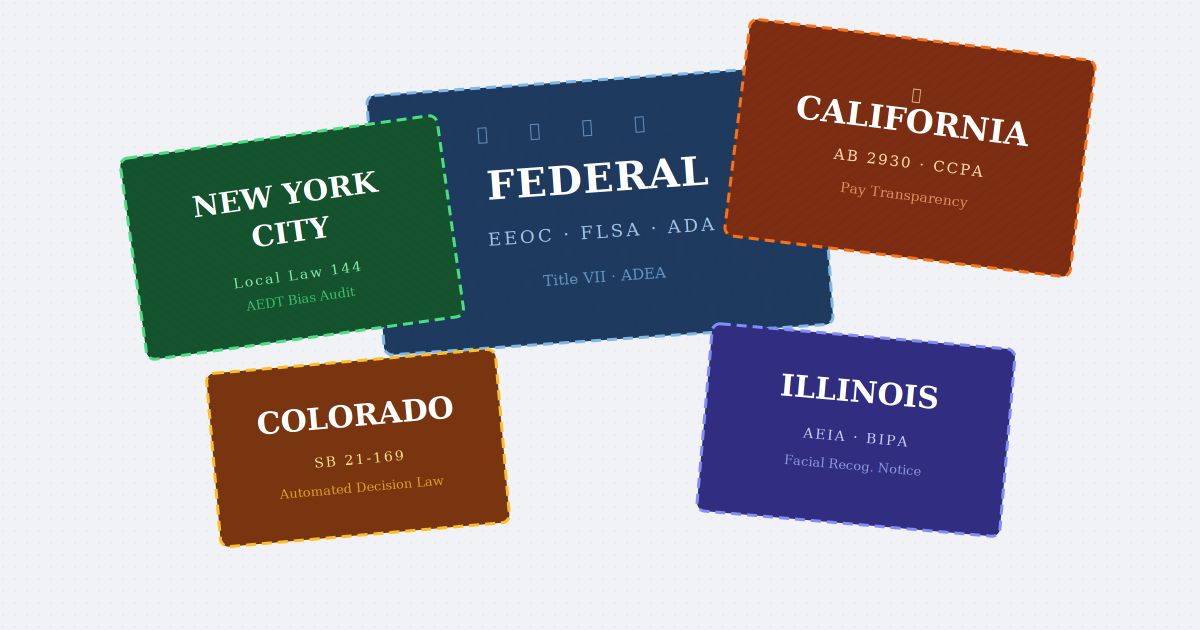
Illinois is live, Colorado lands June 30, twenty states now regulate HR data, and a federal executive order is fighting all of it. Chasing each statute is a losing game. Here's the highest-common-standard posture that holds up regardless of how the fight resolves.
Compliance
We'd like to use cookies from Google Analytics (to understand how the site is used) and Google Ads / DoubleClick (to measure our ads). They stay off unless you accept. See our Privacy Policy.
Your browser is sending a Global Privacy Control signal, so tracking is off and we won't sell or share your information.